Home Assistant Badges Are All You Need
Home automation has been a big part of my life since I moved into my house. I started with some smart locks, moved on to automating smart lights and sprinklers, and expanded my tech from there.
Something has always felt off, like I was doing too many actions to get to the outcome I wanted. I’d build dashboards but never use them. I’d continue to open other smart apps to check cameras, control the robot vac, or unlock the front door. This weekend I had a good amount of free time and a desire to do better.
Conditional Badges
I used to think that I wanted dashboards with as much as possible on them. Make them dense with information! Show me metrics about usage and the state of all the devices.
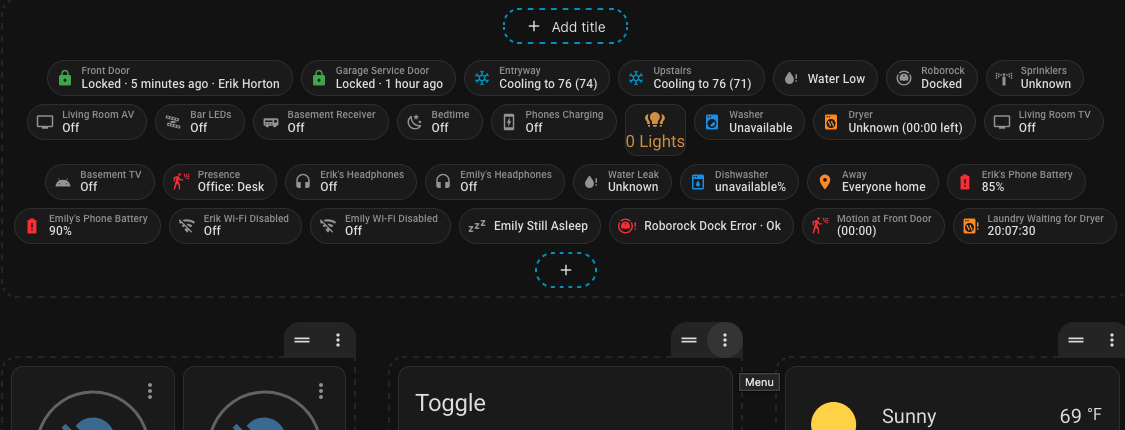
Turns out, all I wanted was conditional badges.
A badge sits at the top of your dashboard for a quick, at-a-glance overview of entity status. This seems almost too simple, but when paired with conditions and tap actions, you get the information you need when you need it.
Philosophy
- You should see the important information only when it’s relevant
- There’s ideally 1 action you’d want to take when you see the badge
- Items with a time component would show in real time how much time has passed or remains
- You should be able to hide badges with a toggle, allowing for manual or automatic control of which badges show
Examples
I’ll include a full list of my badges later in the post, but some things I’ve set up are:
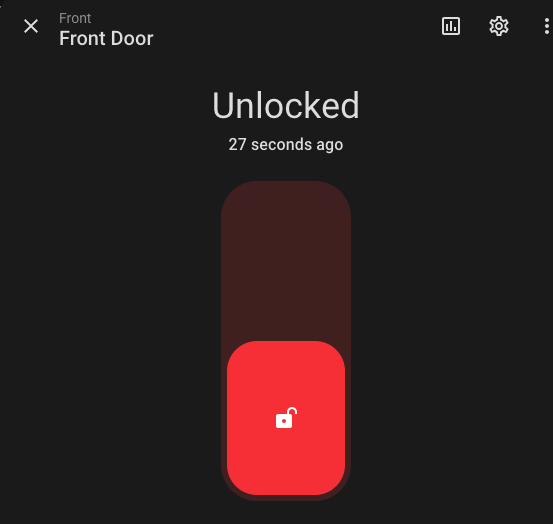
- When the front door is unlocked, show a badge that will lock the door again when tapped. When my phone arrives back on home wifi from being away, show another badge that when tapped unlocks the door.
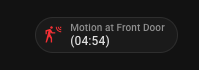
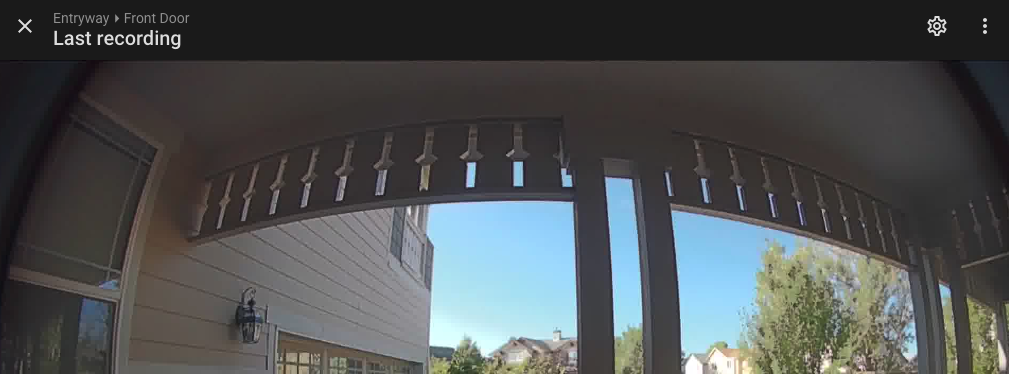
- If motion is detected by the doorbell camera, it’ll show a badge with a 5m countdown. Tapping the badge will open up the last motion event to watch.
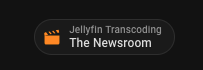
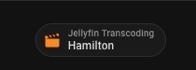
- If I’m watching Jellyfin, show a badge that tells me if it’s having to transcode the video instead of using direct play. On certain videos, transcoding will use up way too much CPU and lead to a lot of stopping/starting. This badge let’s me see at a glance where the problem is.
Example 1: Front Door is Unlocked
Show YAML
- type: entity
  entity: lock.front_door
  name: Front Door
  show_name: true
  show_state: true
  show_icon: true
  state_content:
  - state
  - last_updated
  - changed_by
  # Outer condition must be true (input boolean enabled)
  visibility:
  - condition: state
    entity: input_boolean.show_front_door_badge
    state: 'on'
    # and any inside condition true (front door is unlocked)
  - condition: or
    conditions:
    - condition: state
      entity: lock.front_door
      state: unlocked
  # If tapped, open the ability to control the lock with one more tap
  tap_action:
    action: more-info
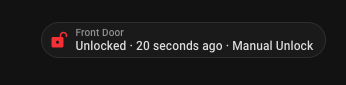
Tap to lock the front door:
Example 2: Doorbell motion
Show YAML
- type: entity
  entity: sensor.front_door_motion_countdown
  name: Motion at Front Door
  icon: mdi:motion-sensor
  color: red
  show_name: true
  show_icon: true
  show_state: true
  visibility:
  # Both conditions must be true: Both the boolean that we want to see this badge
  # and the timer is active
  - condition: state
    entity: input_boolean.show_front_door_motion_badge
    state: 'on'
  - condition: state
    entity: timer.front_door_motion_badge
    state: active
  tap_action:
    action: more-info
    entity: camera.front_door
Tap to see the last motion event:
Example 3: Jellyfin is transcoding
Show YAML
- type: entity
  entity: sensor.jellyfin_transcoding_details
  name: Jellyfin Transcoding
  icon: mdi:movie-open
  color: orange
  show_name: true
  show_state: true
  show_icon: true
  state_content:
  - state
  visibility:
  # Both conditions must be true:  Both the boolean that we want to see this badge
  # and the sensor is above 0 (number of shows/movies transcoding)
  - condition: state
    entity: input_boolean.show_jellyfin_transcoding_badge
    state: 'on'
  - condition: numeric_state
    entity: sensor.jellyfin_transcoding
    above: 0
  tap_action:
    action: more-info
At-a-Glance
While opening the app and seeing the badges is useful, it can be even more useful to have them show up on a phone widget or watch. Quickly glancing at either will show you if anything out of the norm is happening.
To do this, I created a jinja template that can be used by either a widget on my phone or my watch via the companion app’s templates and Wear OS integration.
Template
This is my template and it’s constantly updating as I add new input booleans. Modify it to fit your needs.
Show Jinja template
{% set active = namespace(items=[]) %}

{# Presence #}
{% if is_state('input_boolean.presence_badge_enabled', 'on')
      and is_state('binary_sensor.any_presence_active', 'on') %}
  {% set active.items = active.items + [
    "<font color='#ff5252'>🏠 Presence: "
    ~ states('sensor.active_presence_zones')
    ~ "</font>"
  ] %}
{% endif %}

{# Door locks #}
{% if is_state('input_boolean.show_front_door_badge', 'on')
  and is_state('lock.front_door', 'unlocked') %}
  {% set active.items = active.items + [
    "<font color='#ef5350'>🔓 Front Door Unlocked</font>"
  ] %}
{% endif %}

{% if is_state('input_boolean.show_arrival_unlock_badge', 'on')
      and is_state('binary_sensor.erik_front_door_quick_unlock', 'on') %}
  {% set active.items = active.items + [
    "<font color='#42a5f5'>🔐 Front Door Ready to Unlock</font>"
  ] %}
{% endif %}

{% if is_state('input_boolean.show_garage_service_door_badge', 'on')
  and is_state('lock.garage_service_door', 'unlocked') %}
  {% set active.items = active.items + [
    "<font color='#ef5350'>🔓 Garage Service Door Unlocked</font>"
  ] %}
{% endif %}

{# Away locations #}
{% if is_state('input_boolean.show_away_badge', 'on')
  and states('sensor.people_away_locations') not in [
  'Everyone home',
  'unknown',
  'unavailable',
  ''
] %}
  {% set active.items = active.items + [
    "<font color='#ff9800'>📍 "
    ~ states('sensor.people_away_locations')
    ~ "</font>"
  ] %}
{% endif %}

{# Roborock #}
{% if is_state('input_boolean.show_roborock_badge', 'on')
  and is_state('binary_sensor.roborock_s7_maxv_active', 'on') %}
  {% set roborock_activity = state_attr('binary_sensor.roborock_s7_maxv_active', 'activity') %}
  {% set active.items = active.items + [
    "<font color='#26a69a'>🤖 Roborock: "
    ~ (roborock_activity if roborock_activity else states('sensor.roborock_s7_maxv_status') | title)
    ~ "</font>"
  ] %}
{% endif %}

{# Water low #}
{% if is_state('input_boolean.show_roborock_water_shortage_badge', 'on')
  and is_state('binary_sensor.roborock_s7_maxv_water_shortage', 'on') %}
  {% set active.items = active.items + [
    "<font color='#42a5f5'>💧 Roborock Water Low</font>"
  ] %}
{% endif %}

{# Roborock dock error #}
{% set roborock_dock_error = states('sensor.roborock_s7_maxv_dock_error') %}
{% if is_state('input_boolean.show_roborock_dock_error_badge', 'on')
  and roborock_dock_error not in ['ok', 'unknown', 'unavailable', ''] %}
  {% set active.items = active.items + [
    "<font color='#ff1744'>🚨 Roborock Dock: "
    ~ (roborock_dock_error | replace('_', ' ') | title)
    ~ "</font>"
  ] %}
{% endif %}

{# Sprinklers #}
{% if is_state('input_boolean.show_sprinklers_badge', 'on')
  and is_state('binary_sensor.sprinklers_active', 'on') %}
  {% set active.items = active.items + [
    "<font color='#42a5f5'>💦 Sprinklers: "
    ~ states('sensor.active_sprinklers')
    ~ "</font>"
  ] %}
{% endif %}

{# Lights #}
{% if is_state('input_boolean.show_lights_badge', 'on')
      and is_state('binary_sensor.lights_active', 'on') %}
  {% set active.items = active.items + [
    "<font color='#ffd740'>💡 Lights: "
    ~ states('sensor.active_lights')
    ~ "</font>"
  ] %}
{% endif %}

{# Water leaks #}
{% if is_state('input_boolean.show_water_leak_badge', 'on')
  and is_state('binary_sensor.any_water_leak_detected', 'on') %}
  {% set active.items = active.items + [
    "<font color='#ff1744'><b>🚨 Water Leak: "
    ~ states('sensor.active_water_leaks')
    ~ "</b></font>"
  ] %}
{% endif %}

{# Dishwasher #}
{% if is_state('input_boolean.show_dishwasher_badge', 'on')
  and states('sensor.dishwasher_program_progress') not in [
  'unknown',
  'unavailable',
  ''
] %}
  {% set active.items = active.items + [
    "<font color='#29b6f6'>🍽️ Dishwasher: "
    ~ states('sensor.dishwasher_status')
    ~ "</font>"
  ] %}
{% endif %}

{# Washer #}
{% if is_state('input_boolean.show_washer_badge', 'on')
  and is_state('binary_sensor.washer_running', 'on') %}
  {% set washer_completion = states('sensor.washer_washer_completion_time') %}
  {% set washer_completion_timestamp = as_timestamp(washer_completion, default=none) %}
  {% if washer_completion_timestamp is not none %}
    {% set washer_seconds_left = [
      (washer_completion_timestamp - as_timestamp(now())) | int(0),
      0
    ] | max %}
    {% set washer_minutes = washer_seconds_left // 60 %}
    {% set washer_seconds = washer_seconds_left % 60 %}
    {% set washer_time_text = ' (' ~ ('%02d:%02d' | format(washer_minutes, washer_seconds)) ~ ' left)' %}
  {% else %}
    {% set washer_time_text = '' %}
  {% endif %}
  {% set active.items = active.items + [
    "<font color='#29b6f6'>🧺 Washer: "
    ~ states('sensor.washer_activity')
    ~ washer_time_text
    ~ "</font>"
  ] %}
{% endif %}

{# Dryer #}
{% if is_state('input_boolean.show_dryer_badge', 'on')
  and is_state('binary_sensor.dryer_running', 'on') %}
  {% set dryer_completion = states('sensor.dryer_dryer_completion_time') %}
  {% set dryer_completion_timestamp = as_timestamp(dryer_completion, default=none) %}
  {% if dryer_completion_timestamp is not none %}
    {% set dryer_seconds_left = [
      (dryer_completion_timestamp - as_timestamp(now())) | int(0),
      0
    ] | max %}
    {% set dryer_minutes = dryer_seconds_left // 60 %}
    {% set dryer_seconds = dryer_seconds_left % 60 %}
    {% set dryer_time_text = ' (' ~ ('%02d:%02d' | format(dryer_minutes, dryer_seconds)) ~ ' left)' %}
  {% else %}
    {% set dryer_time_text = '' %}
  {% endif %}
  {% set active.items = active.items + [
    "<font color='#ff9800'>🔥 Dryer: "
    ~ states('sensor.dryer_activity')
    ~ dryer_time_text
    ~ "</font>"
  ] %}
{% endif %}

{# Entryway HVAC #}
{% if is_state('input_boolean.show_entryway_cooling_badge', 'on')
  and is_state('binary_sensor.entryway_hvac_active', 'on') %}
  {% set active.items = active.items + [
    "<font color='#00bcd4'>❄️ Entryway: "
    ~ states('sensor.entryway_cooling_status')
    ~ "</font>"
  ] %}
{% endif %}

{# Upstairs HVAC #}
{% if is_state('input_boolean.show_upstairs_cooling_badge', 'on')
  and is_state('binary_sensor.upstairs_hvac_active', 'on') %}
  {% set active.items = active.items + [
    "<font color='#00bcd4'>❄️ Upstairs: "
    ~ states('sensor.upstairs_cooling_status')
    ~ "</font>"
  ] %}
{% endif %}

{# Media and AV #}
{% if is_state('input_boolean.show_living_room_av_badge', 'on')
  and is_state('switch.living_room_av', 'on') %}
  {% set active.items = active.items + [
    "<font color='#90a4ae'>📺 Living Room AV On</font>"
  ] %}
{% endif %}

{% if is_state('input_boolean.show_bar_leds_badge', 'on')
  and is_state('light.wled', 'on') %}
  {% set active.items = active.items + [
    "<font color='#ffd740'>🌈 Bar LEDs On</font>"
  ] %}
{% endif %}

{% if is_state('input_boolean.show_basement_receiver_badge', 'on')
  and states('media_player.basement_receiver') not in [
  'off',
  'idle',
  'standby',
  'unknown',
  'unavailable'
] %}
  {% set active.items = active.items + [
    "<font color='#90a4ae'>🔊 Basement Receiver "
    ~ states('media_player.basement_receiver') | title
    ~ "</font>"
  ] %}
{% endif %}

{% if is_state('input_boolean.show_living_room_tv_badge', 'on')
  and states('media_player.sony_bravia_tv_living_room') not in [
  'off',
  'idle',
  'standby',
  'unknown',
  'unavailable'
] %}
  {% set active.items = active.items + [
    "<font color='#90a4ae'>📺 Living Room TV "
    ~ states('media_player.sony_bravia_tv_living_room') | title
    ~ "</font>"
  ] %}
{% endif %}

{% if is_state('input_boolean.show_jellyfin_transcoding_badge', 'on')
  and states('sensor.jellyfin_transcoding') | int(0) > 0 %}
  {% set active.items = active.items + [
    "<font color='#ff9800'>🎞️ Jellyfin Transcoding: "
    ~ states('sensor.jellyfin_transcoding_details')
    ~ "</font>"
  ] %}
{% endif %}

{% if is_state('input_boolean.show_basement_tv_badge', 'on')
  and states('media_player.basement_android_tv') not in [
  'off',
  'idle',
  'standby',
  'unknown',
  'unavailable'
] %}
  {% set active.items = active.items + [
    "<font color='#90a4ae'>📺 Basement TV "
    ~ states('media_player.basement_android_tv') | title
    ~ "</font>"
  ] %}
{% endif %}

{# Erik headphones #}
{% if is_state('input_boolean.show_eriks_headphones_badge', 'on')
      and is_state('binary_sensor.erik_s_headphones_active', 'on') %}
  {% set active.items = active.items + [
    "<font color='#43a047'>🎧 Erik's Headphones</font>"
  ] %}
{% endif %}

{# Emily headphones #}
{% if is_state('input_boolean.show_emilys_headphones_badge', 'on')
      and is_state('binary_sensor.emily_s_headphones_active', 'on') %}
  {% set active.items = active.items + [
    "<font color='#c2185b'>🎧 Emily's Headphones</font>"
  ] %}
{% endif %}

{# Phone batteries #}
{% if is_state('input_boolean.show_eriks_phone_battery_badge', 'on')
  and states('sensor.pixel_9_battery_level') | int(100) < 30 %}
  {% set active.items = active.items + [
    "<font color='#ef5350'>🔋 Erik Phone "
    ~ states('sensor.pixel_9_battery_level')
    ~ "%</font>"
  ] %}
{% endif %}

{% if is_state('input_boolean.show_emilys_phone_battery_badge', 'on')
  and states('sensor.clefairy_battery_level') | int(100) < 30 %}
  {% set active.items = active.items + [
    "<font color='#ef5350'>🔋 Emily Phone "
    ~ states('sensor.clefairy_battery_level')
    ~ "%</font>"
  ] %}
{% endif %}

{# Erik Wi-Fi #}
{% if is_state('input_boolean.show_eriks_wifi_disabled_badge', 'on')
  and is_state('binary_sensor.erik_wi_fi_disabled_at_home', 'on') %}
  {% set active.items = active.items + [
    "<font color='#ef5350'>📶 Erik Wi-Fi Disabled</font>"
  ] %}
{% endif %}

{# Emily Wi-Fi #}
{% if is_state('input_boolean.show_emilys_wifi_disabled_badge', 'on')
  and is_state('binary_sensor.emily_wi_fi_disabled_at_home', 'on') %}
  {% set active.items = active.items + [
    "<font color='#ef5350'>📶 Emily Wi-Fi Disabled</font>"
  ] %}
{% endif %}

{# Emily still asleep #}
{% if is_state('input_boolean.show_emilys_still_asleep_badge', 'on')
  and is_state('input_boolean.bedtime', 'off')
  and is_state('binary_sensor.clefairy_is_charging', 'on')
  and now().hour < 10 %}
  {% set active.items = active.items + [
    "<font color='#ffb300'>💤 Emily Still Asleep</font>"
  ] %}
{% endif %}

{# Bedtime #}
{% if is_state('input_boolean.show_bedtime_badge', 'on')
  and is_state('input_boolean.bedtime', 'on') %}
  {% set active.items = active.items + [
    "<font color='#7986cb'>🌙 Bedtime</font>"
  ] %}
{% endif %}

{# Phones charging #}
{% if is_state('input_boolean.show_phones_charging_badge', 'on')
  and is_state('input_boolean.phones_are_charging', 'on') %}
  {% set active.items = active.items + [
    "<font color='#29b6f6'>📱 Phones Charging</font>"
  ] %}
{% endif %}

{# Front door motion #}
{% if is_state('input_boolean.show_front_door_motion_badge', 'on')
  and is_state('timer.front_door_motion_badge', 'active') %}
  {% set active.items = active.items + [
    "<font color='#ff1744'>🚨 Motion at Front Door "
    ~ states('sensor.front_door_motion_countdown')
    ~ "</font>"
  ] %}
{% endif %}

{# Frigate person detection #}
{% if is_state('input_boolean.show_frigate_person_badge', 'on')
  and is_state('binary_sensor.frigate_person_detected', 'on') %}
  {% set active.items = active.items + [
    "<font color='#ff1744'>👤 Person Detected: "
    ~ states('sensor.frigate_person_detected_cameras')
    ~ "</font>"
  ] %}
{% endif %}

{# Laundry waiting for dryer #}
{% if is_state('input_boolean.show_laundry_badge', 'on')
  and is_state('binary_sensor.laundry_pending_dryer', 'on') %}
  {% set active.items = active.items + [
    "<font color='#ff9800'>🧺 Laundry Waiting for Dryer ("
    ~ states('sensor.laundry_waiting_duration')
    ~ ")</font>"
  ] %}
{% endif %}

{% if active.items %}
  <b>Active</b><br>
  {{ active.items | join('<br>') }}
{% else %}
  Nothing active
{% endif %}
Phone widget
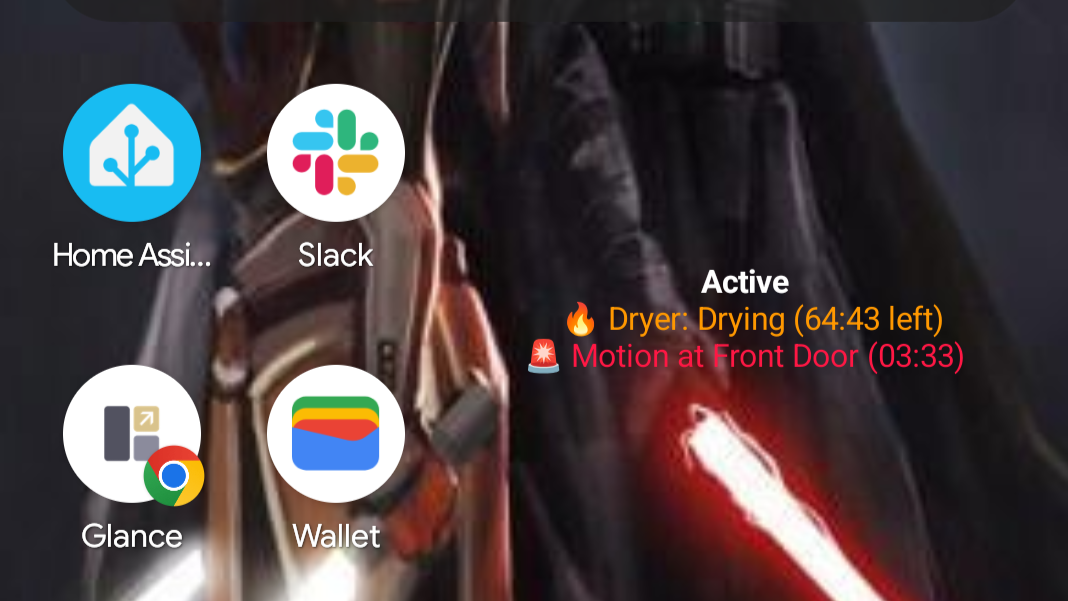
- Widgets -> Add Home Assistant Widget -> Template widget
- Paste in the contents
- Set text size to 12 and theme to transparent
Tapping the widget will cause it to update.
Watch face
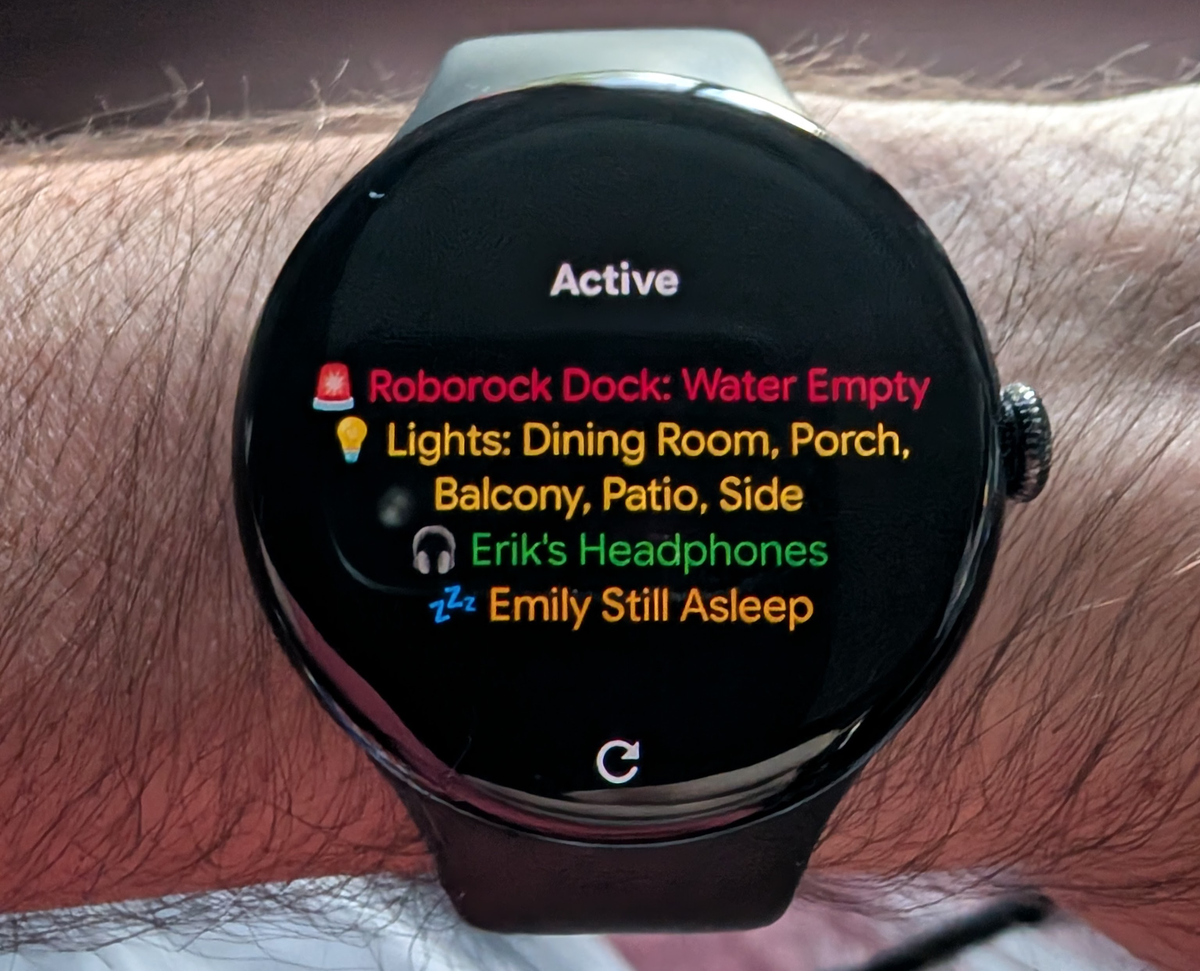
- Open the Home Assistant app on your phone
- Go to Settings -> Companion App -> Wear OS Settings -> Template files
- Paste in the contents
Tapping the watch face will cause it to update.
Full List of Badges
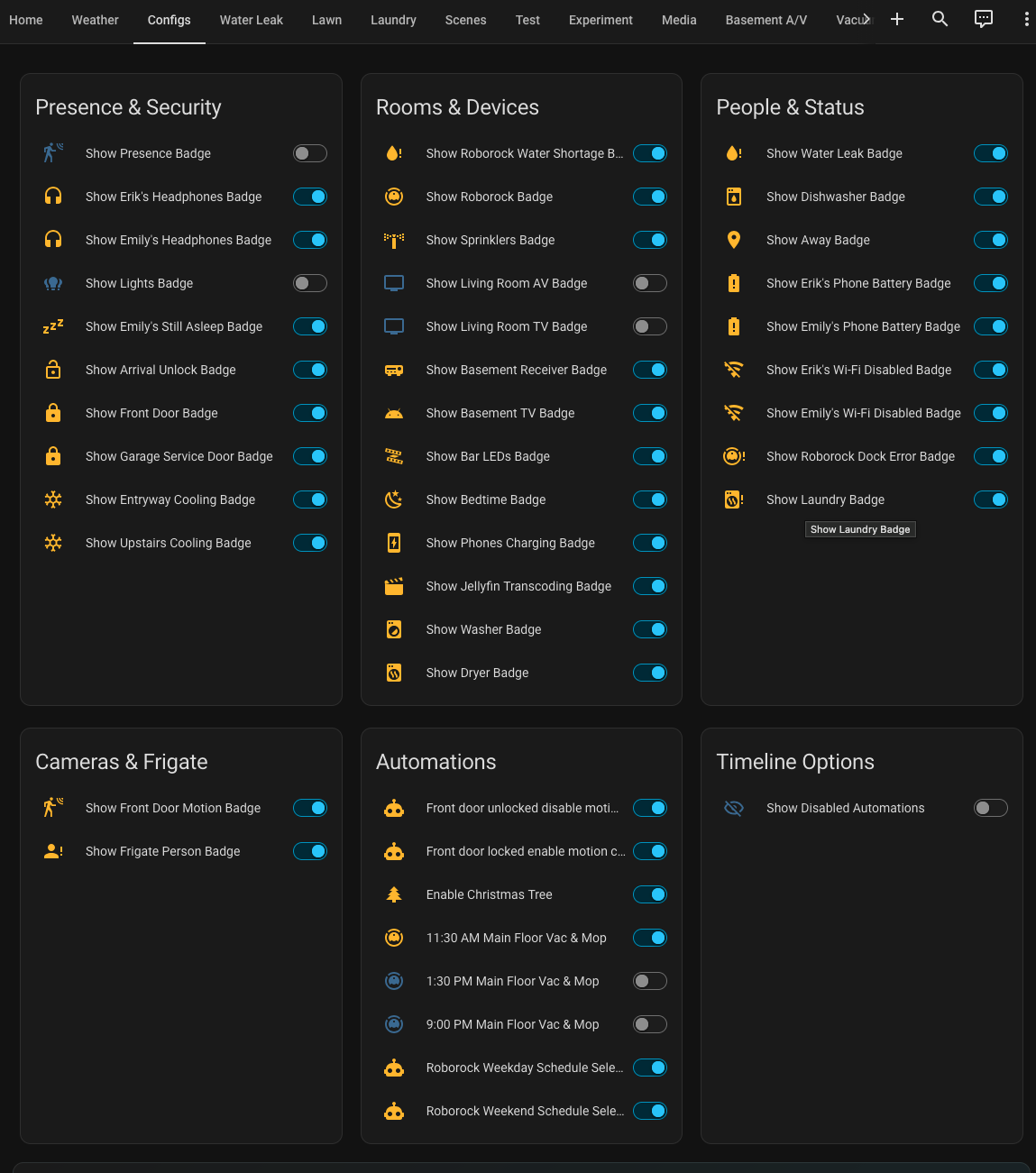
Each badge has at least a condition that its equivalent input boolean is enabled. This let’s us disable ones we don’t want to see. I put all of these on a single config page.
Config page
Badges
At the time of writing, these are the badges I have set up, the conditions that trigger them, and the actions I can take.
| Badge | Description | Conditions | Tap Action |
|---|---|---|---|
| 💡 Lights On | Shows one light’s name or a count of active lights | • Enabled • Any tracked light is on |
Turns off one light, or opens a popup listing active lights |
| 💦 Sprinklers | Shows active sprinkler zones | • Enabled • Any sprinkler is active |
Opens a popup with each zone and its last change |
| 📺 Living Room AV | Shows when the living-room AV system is on | • Enabled • AV switch is on |
Opens a confirmed power-off action |
| 🔊 Basement Receiver | Shows when the receiver is active | • Enabled • Receiver is not off, idle, standby, or unavailable |
Opens a confirmed power-off action |
| 🔓 Tap to Unlock Front Door | Temporary arrival shortcut with a countdown | • Enabled • Quick-unlock sensor is on |
Unlocks the front door |
| 🧺 Laundry Waiting for Dryer | Reminds me to move laundry to the dryer | • Enabled • Laundry is pending |
Dismisses the reminder after confirmation |
| 🚨 Motion at Front Door | Shows a five-minute motion countdown | • Enabled • Motion timer is active |
Opens the front-door camera |
| 🚨 Person Detected | Frigate person-detection alert from that camera | • Camera alerts enabled • Person detected |
Opens the camera for the detected location |
| 🔒 Front Door | Shows the lock state and who last changed it | • Enabled • Door is unlocked |
Opens lock controls |
| 🔒 Garage Service Door | Shows when the garage service door is unlocked | • Enabled • Door is unlocked |
Opens lock controls |
| 🎬 Jellyfin Transcoding | Shows current transcoding details | • Enabled • At least one item is transcoding |
Opens details |
| 🤖 Roborock Dock Error | Shows a dock error other than normal, unknown, or unavailable | • Enabled • Dock reports an error |
Opens details |
| 📺 Living Room TV | Shows when the TV is active | • Enabled • TV is not off, idle, standby, unavailable, or unknown |
Opens details |
| 📺 Basement TV | Shows when the Android TV is active | • Enabled • TV is not off, idle, standby, unavailable, or unknown |
Opens details |
| 🍽️ Dishwasher | Shows the dishwasher status | • Enabled • Program progress is available |
Opens details |
| ❄️ Entryway | Shows active entryway cooling | • Enabled • Cooling is active |
Opens details |
| ❄️ Upstairs | Shows active upstairs cooling | • Enabled • Cooling is active |
Opens details |
| 🤖 Roborock | Shows the robot vacuum’s active state | • Enabled • Vacuum is active |
Opens details |
| 💧 Water Low | Warns that the robot vacuum needs water | • Enabled • Water shortage detected |
Opens details |
| 🧺 Washer | Shows the washer’s countdown while running | • Enabled • Washer is running |
Opens details |
| 🧺 Dryer | Shows the dryer’s countdown while running | • Enabled • Dryer is running |
Opens details |
| 👁️ Presence | Shows active presence zones | • Enabled • Any presence zone is active |
Opens details |
| 💧 Water Leak | Shows active water leaks | • Enabled • A leak is detected |
Opens details |
| 📍 Away | Shows locations for people who are away | • Enabled • Someone is away |
Opens details |
| 🔋 Erik’s Phone Battery | Warns when Erik’s phone battery is low | • Enabled • Battery is below 30% |
Opens details |
| 🔋 Emily’s Phone Battery | Warns when Emily’s phone battery is low | • Enabled • Battery is below 30% |
Opens details |
| 📶 Erik Wi-Fi Disabled | Warns when Erik disables Wi-Fi at home | • Enabled • Wi-Fi is disabled |
Opens details |
| 📶 Emily Wi-Fi Disabled | Warns when Emily disables Wi-Fi at home | • Enabled • Wi-Fi is disabled |
Opens details |
| 🎧 Erik’s Headphones | Shows when Erik’s headphones are active | • Enabled • Headphones are active |
Opens details |
| 🎧 Emily’s Headphones | Shows when Emily’s headphones are active | • Enabled • Headphones are active |
Opens details |
| 💡 Bar LEDs | Shows when the bar LED strip is on | • Enabled • LEDs are on |
Opens details |
| 🌙 Bedtime | Shows when bedtime mode is enabled | • Enabled • Bedtime is on |
Toggles bedtime mode |
| 📱 Phones Charging | Shows when the phones are charging | • Enabled • Phones are charging |
Toggles the helper |
| 😴 Emily Still Asleep | Indicates that Emily’s phone is still charging in the morning | • Enabled • Bedtime is off • Phone is charging • Before 10:00 AM |
Opens details |
Spouse approval
👍👍👍 Headphones? You might be wondering: why display when either my wife or I have bluetooth headphones connected? Well we both have earbuds we use, listening to books or podcasts around the house. It’s hard for me to tell if my wife is in the middle of something, and I tend to burst into a room saying: GOOD NEWS EVERYONE, I AUTOMATED A THING. This will prevent a: sigh, pause, pull out earbud, what?, repeat.
👍👍 When the washer finishes and laundry hasn’t been moved over to the dryer, a counter starts and displays a badge with how long the clothes have been sitting in the washer without the dryer running. Starting the dryer will clear the badge. If you instead decide to hang your clothes, you can tap the badge to close it out instead.
👍 If either of us are home and our phone isn’t on wifi, a badge will show indicating this so we don’t unnecessarily use mobile data.
Custom Timers
Several of my badges display a countdown or count up. I use custom timers for those badges so they can show how much time remains or how long something has been active. The front-door motion badge below is one example of using a timer. I keep each related feature in its own package file. First, I tell Home Assistant to load every YAML file in the packages directory from configuration.yaml:
homeassistant:
  # ...
  packages: !include_dir_named packages
Then I put the timer, automation, and countdown sensor in packages/front_door_motion_badge.yaml:
Show Front Door Motion Package
timer:
  front_door_motion_badge:
    name: Front Door Motion Badge
    duration: "00:05:00"

automation:
- alias: Front Door Motion Badge Timer
  id: front_door_motion_badge_timer
  trigger:
  - platform: state
    entity_id: sensor.front_door_last_motion
  condition:
  - condition: template
    value_template: >
      {{ trigger.to_state.state not in ['unknown', 'unavailable', ''] }}
  action:
  - service: timer.start
    target:
      entity_id: timer.front_door_motion_badge
  mode: restart

template:
- triggers:
  - trigger: time_pattern
    seconds: "/1"
  sensor:
  - name: Front Door Motion Countdown
    unique_id: front_door_motion_countdown
    icon: mdi:motion-sensor
    state: >
      {% set finishes_at = state_attr('timer.front_door_motion_badge', 'finishes_at') %} {% if is_state('timer.front_door_motion_badge', 'active') and finishes_at %}
        {% set seconds_left = [
          (as_timestamp(finishes_at) - as_timestamp(now())) | int(0),
          0
        ] | max %}
        {% set minutes = seconds_left // 60 %}
        {% set seconds = seconds_left % 60 %}
        ({{ '%02d:%02d' | format(minutes, seconds) }})
      {% else %}
        (00:00)
      {% endif %}
The automation restarts the five-minute timer whenever sensor.front_door_last_motion changes. The template sensor updates once per second and calculates the remaining time from the timer’s finishes_at attribute. The badge checks whether the timer is active, while the phone and watch templates display the countdown sensor. When the timer expires, the badge disappears automatically.
Arrival Unlock Notifications
I also use a similar timer for arriving home. When my phone reconnects to the home Wi-Fi, Home Assistant starts a short arrival window and sends me a notification that opens the front-door controls when tapped. The door is not unlocked automatically; the notification takes me directly to the lock so I can decide whether to unlock it.
The relevant parts of the package look like this:
Show Arrival Unlock Package
# Keep the front-door controls available for one minute after arriving home.
timer:
  erik_arrival_front_door:
    name: Erik Arrival Front Door
    duration: "00:01:00"

# These template entities are used by the arrival badge and notification flow.
template:
- binary_sensor:
  - name: Erik Front Door Quick Unlock
    unique_id: erik_front_door_quick_unlock
    icon: mdi:lock-open-outline
    state: >
      {{ is_state('timer.erik_arrival_front_door', 'active')
         and is_state('lock.front_door', 'locked') }}
- triggers:
  # Refresh the displayed countdown once per second while the timer is active.
  - trigger: time_pattern
    seconds: "/1"
  sensor:
  - name: Erik Front Door Unlock Countdown
    unique_id: erik_front_door_unlock_countdown
    icon: mdi:timer-lock-outline
    state: >
      {% set finishes_at = state_attr(
        'timer.erik_arrival_front_door',
        'finishes_at'
      ) %} {% if is_state('timer.erik_arrival_front_door', 'active') and finishes_at %}
        {% set seconds_left = [
          (as_timestamp(finishes_at) - as_timestamp(now())) | int(0),
          0
        ] | max %}
        {% set minutes = seconds_left // 60 %}
        {% set seconds = seconds_left % 60 %}
        ({{ '%02d:%02d' | format(minutes, seconds) }})
      {% else %}
        (00:00)
      {% endif %}

automation:
- alias: Start Erik Front Door Arrival Window
  id: start_erik_front_door_arrival_window
  # Either phone can start the arrival window when it reconnects at home.
  trigger:
  - platform: state
    entity_id: sensor.pixel_9_wifi_connection
    to:
    - HomeNetwork
  - platform: state
    entity_id: sensor.clefairy_wifi_connection
    to:
    - HomeNetwork
  # Ignore changes between home networks; this should only run after being away.
  condition:
  - condition: template
    value_template: >
      {% set previous_wifi = trigger.from_state.state | lower
        if trigger.from_state is not none else '' %}
      {{ previous_wifi in [
        'xfinity mobile',
        '<not connected>',
        'not connected',
        'disconnected',
        'off',
        'unknown',
        'unavailable',
        ''
      ] }}
  action:
  # Restarting the timer also extends the window if the automation runs again.
  - service: timer.start
    target:
      entity_id: timer.erik_arrival_front_door
  - choose:
    - conditions:
      - condition: template
        # Only send the notification to Erik's phone for this example.
        value_template: >
          {{ trigger.entity_id == 'sensor.pixel_9_wifi_connection' }}
      sequence:
      - service: notify.mobile_app_leafeon
        data:
          title: Welcome home
          message: Front door controls are ready
          data:
            # Tapping the notification opens the lock controls; it does not unlock it.
            clickAction: entityId:lock.front_door
  mode: restart
Bonus: Frigate Person Detection
As part of this effort, I also set up Frigate in another docker container to integrate over RTSP with my cameras. This let me set up person detection and have a badge show up when a person enters a motion zone. I can tap the badge to open the camera for that location.
I also have turn on some LEDs around the bar in my basement that trigger when a person is detected or turns them off when they leave.
Show Frigate docker-compose entry
services:
  # ...

  frigate:
    container_name: frigate
    image: ghcr.io/blakeblackshear/frigate:stable
    privileged: true
    restart: unless-stopped
    shm_size: "512mb"

    ports:
      - "8971:8971"
      - "8554:8554"
      - "8555:8555/tcp"
      - "8555:8555/udp"

    volumes:
      - /volume1/docker/configs/frigate/config:/config
      - /volume1/docker/configs/frigate/storage:/media/frigate
      - /etc/localtime:/etc/localtime:ro
Show Frigate Config
mqtt:
  enabled: true
  host: <mosquitto_ip>
  port: 1883
  topic_prefix: frigate

cameras:
  camera_1:
    enabled: true
    friendly_name: Camera 1
    ffmpeg:
      inputs:
        - path: rtsp://username:password@camera_ip/live0
          roles:
            - detect
    detect:
      width: 1280
      height: 720
    live:
      streams:
        Stream 1: camera_1
    motion: {}
    zones:
      camera_1_zone:
        coordinates:
          0.001,0.837,0.376,0.544,0.994,0.52,0.994,0.835,0.826,0.994,0.002,0.996
        inertia: 3
        loitering_time: 0
        objects: person
        friendly_name: Camera 1 Zone
# camera_2:
# ...

version: 0.17-0
go2rtc:
  streams:
    # stream 1:
    # - rtsp://username:password@camera_ip/live0
    # stream 2:
    # ...
semantic_search:
  enabled: false
  model_size: small
face_recognition:
  enabled: true
  model_size: small
lpr:
  enabled: false
classification:
  bird:
    enabled: false
Bonus: Timeline View
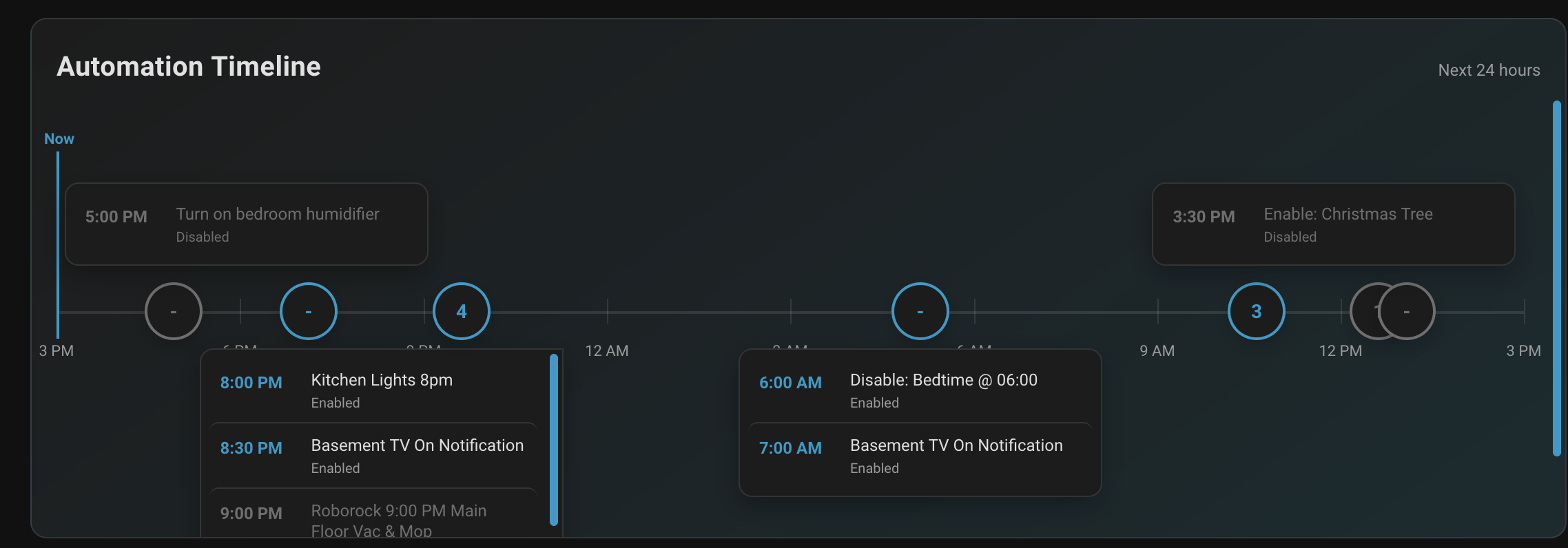
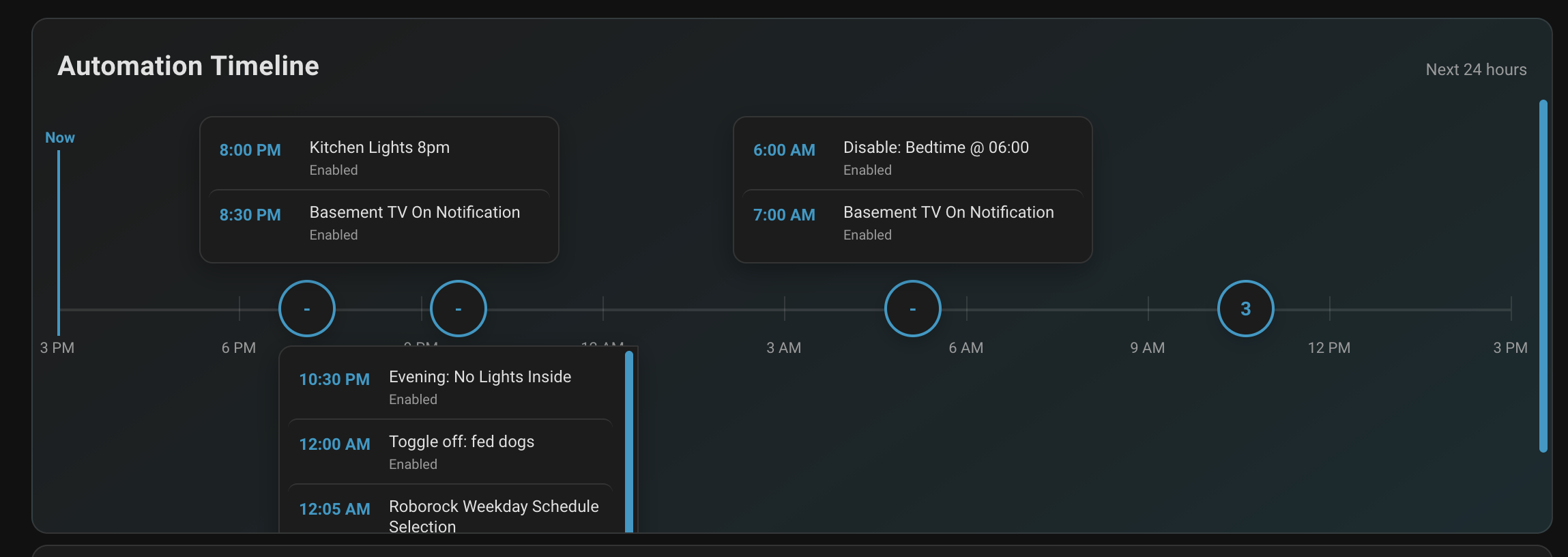
Somewhat unrelated to badges but in the spirit of at-a-glance information, I also set up a timeline view for my scheduled automations. This lets me quickly see what is scheduled to happen and whether those automations are enabled.
This is the JavaScript I use to generate the timeline view. It is a Home Assistant custom card that uses Home Assistant’s WebSocket API to discover automations with time triggers and then displays their upcoming occurrences.
Clicking a node on the timeline expands it to show the automations scheduled around that time. Clicking the node again collapses the list so the timeline returns to its overview.
Show Timeline JS
const CARD_VERSION = "0.1.0";
class AutomationTimelineCard extends HTMLElement {
constructor() {
super();
this.attachShadow({ mode: "open" });
this.expandedGroups = new Set();
this.collapsedGroups = new Set();
this.clusterScrollPositions = new Map();
this.config = { hours: 24, schedules: [] };
this.discoveredSchedules = null;
this.discoveryPromise = null;
this.lastStateSignature = null;
this.clockTimer = null;
}
setConfig(config) {
const schedules = Array.isArray(config?.schedules)
? config.schedules.filter(
(schedule) =>
typeof schedule?.name === "string" &&
typeof schedule?.time === "string" &&
Array.isArray(schedule?.days),
)
: [];
this.config = { hours: Number(config?.hours) || 24, ...config, schedules };
this.discoveredSchedules = null;
this.discoveryPromise = null;
this.lastStateSignature = null;
this.render();
}
connectedCallback() {
this.clockTimer = window.setInterval(() => this.render(), 60000);
}
disconnectedCallback() {
if (this.clockTimer) window.clearInterval(this.clockTimer);
this.clockTimer = null;
}
set hass(hass) {
this._hass = hass;
if (this.config.auto_discover && !this.discoveryPromise) {
this.discoveryPromise = this.discoverAutomations();
}
const signature = this.scheduleStateSignature();
if (signature !== this.lastStateSignature) {
this.lastStateSignature = signature;
this.render();
}
}
getCardSize() {
return 5;
}
render() {
const schedules = this.discoveredSchedules?.length
? this.discoveredSchedules
: this.config.schedules;
if (!this.shadowRoot || !schedules.length) return;
this.shadowRoot.querySelectorAll(".cluster-items[data-group]").forEach((panel) => {
this.clusterScrollPositions.set(panel.dataset.group, panel.scrollTop);
});
const now = new Date();
const end = new Date(now.getTime() + this.config.hours * 60 * 60 * 1000);
const showDisabled = this._hass?.states?.[this.config.show_disabled_entity]?.state === "on";
const events = schedules.flatMap((schedule) =>
this.occurrences(schedule, now, end),
).filter((event) => showDisabled || event.enabled);
const groups = this.groupEvents(events, now, end);
const ticks = this.ticks(now, end);
const groupMarkup = groups.map((group, groupIndex) => {
const side = groupIndex % 2 === 0 ? "above" : "below";
return this.renderGroup(group, side);
}).join("");
this.shadowRoot.innerHTML = `
<style>
:host { display: block; }
ha-card { overflow: hidden; }
ha-card { background: linear-gradient(145deg, var(--card-background-color), color-mix(in srgb, var(--card-background-color) 88%, var(--primary-color))); border: 1px solid var(--divider-color); }
.heading { display: flex; justify-content: space-between; align-items: baseline; padding: 18px 18px 6px; }
.title { color: var(--ha-card-header-color, var(--primary-text-color)); font-size: 20px; font-weight: 600; letter-spacing: .01em; }
.range { color: var(--secondary-text-color); font-size: 12px; }
.viewport { overflow-x: auto; padding: 12px 18px 20px; scrollbar-color: var(--primary-color) transparent; }
.timeline { min-width: 920px; position: relative; height: 288px; }
.axis { position: absolute; left: 0; right: 0; top: 144px; border-top: 2px solid var(--divider-color); }
.tick { position: absolute; top: 135px; height: 18px; border-left: 1px solid var(--divider-color); }
.tick-label { position: absolute; top: 164px; transform: translateX(-50%); color: var(--secondary-text-color); font-size: 11px; white-space: nowrap; }
.now { position: absolute; top: 28px; height: 136px; border-left: 2px solid var(--primary-color); z-index: 2; }
.now-label { position: absolute; top: -18px; transform: translateX(-50%); color: var(--primary-color); font-size: 11px; font-weight: 700; white-space: nowrap; }
.branch { position: absolute; top: calc(100% + 8px); height: max(0px, calc(144px - var(--event-top) - 70px)); border-left: 1px solid color-mix(in srgb, var(--primary-color) 65%, transparent); }
.event { position: absolute; transform: translateX(-50%); min-width: 138px; max-width: 172px; text-align: center; }
.event button { width: 100%; min-height: 52px; border: 1px solid color-mix(in srgb, var(--primary-color) 45%, transparent); border-radius: 10px; padding: 8px 10px; background: color-mix(in srgb, var(--primary-color) 82%, var(--card-background-color)); color: var(--text-primary-color, white); cursor: pointer; font: inherit; font-size: 12px; line-height: 1.2; box-shadow: 0 5px 14px rgba(0,0,0,.18); }
.event.disabled button { background: color-mix(in srgb, var(--disabled-text-color) 65%, var(--card-background-color)); border-color: var(--divider-color); }
.event .time { display: block; font-size: 11px; opacity: .78; margin-bottom: 3px; }
.event .dot { position: absolute; left: 50%; top: calc(100% + 8px); width: 9px; height: 9px; transform: translate(-50%, -50%); border: 2px solid var(--card-background-color); border-radius: 50%; background: var(--primary-color); }
.event.disabled .dot { background: var(--disabled-text-color); }
.cluster { position: absolute; transform: translateX(-50%); top: 123px; z-index: 3; }
.cluster button { border: 2px solid var(--primary-color); border-radius: 50%; width: 42px; height: 42px; background: var(--card-background-color); color: var(--primary-color); cursor: pointer; font: inherit; font-weight: 700; box-shadow: 0 4px 12px rgba(0,0,0,.2); }
.cluster.disabled button { border-color: var(--disabled-text-color); color: var(--disabled-text-color); }
.cluster-items { display: none; position: absolute; left: 50%; transform: translateX(-50%); top: 48px; z-index: 4; width: 250px; max-height: 180px; overflow-y: auto; padding: 6px; border: 1px solid var(--divider-color); border-radius: 10px; background: var(--card-background-color); box-shadow: 0 6px 18px rgba(0,0,0,.3); }
.cluster.edge-left .cluster-items { transform: translateX(-30%); }
.cluster.edge-right .cluster-items { transform: translateX(-70%); }
.cluster.above .cluster-items { top: auto; bottom: 54px; max-height: 108px; }
.cluster.expanded .cluster-items { display: block; }
.cluster-event { display: grid; grid-template-columns: 58px 1fr; gap: 8px; align-items: start; padding: 8px; border-radius: 7px; font-size: 12px; text-align: left; }
.cluster-event + .cluster-event { border-top: 1px solid var(--divider-color); }
.cluster-event-time { color: var(--primary-color); font-weight: 700; white-space: nowrap; }
.cluster-event-name { color: var(--primary-text-color); line-height: 1.25; }
.cluster-event-status { display: block; color: var(--secondary-text-color); font-size: 10px; margin-top: 3px; }
.cluster-event.disabled .cluster-event-time, .cluster-event.disabled .cluster-event-name, .cluster-event.disabled .cluster-event-status { color: var(--disabled-text-color); }
.empty { color: var(--secondary-text-color); padding: 20px 4px; text-align: center; }
</style>
<ha-card>
<div class="heading"><div class="title">Automation Timeline</div><div class="range">Next ${this.config.hours} hours</div></div>
<div class="viewport">
<div class="timeline">
<div class="axis"></div>
${ticks.map((tick) => `<div class="tick" style="left:${tick.position}%"></div><div class="tick-label" style="left:${tick.position}%">${tick.label}</div>`).join("")}
<div class="now" style="left:0%"><div class="now-label">Now</div></div>
${groups.length ? groupMarkup : '<div class="empty">No scheduled automations in this window.</div>'}
</div>
</div>
</ha-card>
`;
this.shadowRoot.querySelectorAll("[data-group]").forEach((button) => {
button.addEventListener("click", () => {
const key = button.dataset.group;
if (button.closest(".cluster")?.classList.contains("expanded")) {
this.expandedGroups.delete(key);
this.collapsedGroups.add(key);
} else {
this.collapsedGroups.delete(key);
this.expandedGroups.add(key);
}
this.render();
});
});
this.shadowRoot.querySelectorAll(".cluster-items[data-group]").forEach((panel) => {
panel.scrollTop = this.clusterScrollPositions.get(panel.dataset.group) || 0;
panel.addEventListener("wheel", (event) => event.stopPropagation(), { passive: true });
});
}
async discoverAutomations() {
if (!this._hass?.callWS) return;
const automationEntities = Object.keys(this._hass.states || {}).filter((entityId) =>
entityId.startsWith("automation."),
);
const configs = await Promise.all(
automationEntities.map(async (entityId) => {
try {
return {
entityId,
config: await this._hass.callWS({
type: "automation/config",
entity_id: entityId,
}),
};
} catch (error) {
return null;
}
}),
);
this.discoveredSchedules = configs.flatMap((entry) =>
entry ? this.schedulesFromConfig(entry.entityId, entry.config?.config || entry.config) : [],
);
this.lastStateSignature = this.scheduleStateSignature();
this.render();
}
scheduleStateSignature() {
const schedules = this.discoveredSchedules?.length
? this.discoveredSchedules
: this.config.schedules;
return schedules
.concat({ enabled_entity: this.config.show_disabled_entity })
.map((schedule) => `${schedule.enabled_entity || "always"}:${this._hass?.states?.[schedule.enabled_entity]?.state || "unknown"}`)
.sort()
.join("|");
}
schedulesFromConfig(entityId, config) {
const triggers = config?.triggers || config?.trigger || [];
return (Array.isArray(triggers) ? triggers : [triggers]).flatMap((trigger) => {
const triggerType = trigger?.trigger || trigger?.platform;
if (triggerType !== "time" || typeof trigger.at !== "string") return [];
const days = Array.isArray(trigger.weekday)
? trigger.weekday.map((day) => this.weekdayNumber(day)).filter((day) => day !== null)
: [0, 1, 2, 3, 4, 5, 6];
if (!days.length) return [];
const state = this._hass?.states?.[entityId];
return [{
name: state?.attributes?.friendly_name || entityId,
description: config.description || "Discovered Home Assistant automation.",
time: trigger.at.substring(0, 5),
days,
enabled_entity: this.conditionEntity(config) || entityId,
}];
});
}
conditionEntity(config) {
const conditions = config?.conditions || config?.condition || [];
const entities = [];
const visit = (value) => {
if (Array.isArray(value)) {
value.forEach(visit);
return;
}
if (!value || typeof value !== "object") return;
if (value.condition === "state") {
const entityIds = Array.isArray(value.entity_id) ? value.entity_id : [value.entity_id];
entities.push(...entityIds.filter((entityId) => typeof entityId === "string"));
}
Object.values(value).forEach(visit);
};
visit(conditions);
return entities.find((entityId) => entityId.startsWith("input_boolean.")) || entities[0];
}
weekdayNumber(day) {
return { sun: 0, mon: 1, tue: 2, wed: 3, thu: 4, fri: 5, sat: 6 }[String(day).toLowerCase()] ?? null;
}
renderGroup(group, side) {
const key = group.events.map((event) => event.id).join("|");
const safePosition = Math.min(92, Math.max(8, group.position));
const left = `${safePosition}%`;
const expanded = (group.events.length === 2 && !this.collapsedGroups.has(key)) || this.expandedGroups.has(key);
const disabled = group.events.every((event) => !event.enabled);
const countLabel = group.events.length === 1 ? "automation" : "automations";
const edge = safePosition < 18 ? " edge-left" : safePosition > 82 ? " edge-right" : "";
const clusterClass = `cluster ${side}${edge}${disabled ? " disabled" : ""}`;
if (!expanded) {
return `<div class="${clusterClass}" style="left:${left}"><button data-group="${key}" title="Show ${group.events.length} ${countLabel}">${group.events.length}</button><div class="cluster-items">Click to expand</div></div>`;
}
return `<div class="${clusterClass} expanded" style="left:${left}"><button data-group="${key}" title="Collapse ${countLabel}">-</button><div class="cluster-items" data-group="${key}">${group.events.map((event) => this.clusterEventMarkup(event)).join("")}</div></div>`;
}
eventMarkup(event) {
return `<button title="${this.escape(event.description || event.name)}"><span class="time">${event.time}</span>${this.escape(event.name)}</button><span class="dot"></span>`;
}
clusterEventMarkup(event) {
const status = event.enabled ? "Enabled" : "Disabled";
return `<div class="cluster-event ${event.enabled ? "" : "disabled"}"><div class="cluster-event-time">${event.time}</div><div class="cluster-event-name">${this.escape(event.name)}<span class="cluster-event-status">${status}</span></div></div>`;
}
occurrences(schedule, start, end) {
const result = [];
if (!/^\d{1,2}:\d{2}$/.test(schedule.time)) return result;
for (let offset = 0; offset <= 2; offset += 1) {
const day = new Date(start);
day.setDate(start.getDate() + offset);
const weekday = day.getDay();
if (!schedule.days.includes(weekday)) continue;
const [hours, minutes] = schedule.time.split(":").map(Number);
day.setHours(hours, minutes, 0, 0);
if (day < start || day > end) continue;
const enabled = !schedule.enabled_entity || this._hass?.states?.[schedule.enabled_entity]?.state === "on";
result.push({ ...schedule, id: `${schedule.name}-${day.toISOString()}`, timestamp: day, enabled, time: day.toLocaleTimeString([], { hour: "numeric", minute: "2-digit" }) });
}
return result;
}
groupEvents(events, start, end) {
const sorted = events.sort((a, b) => a.timestamp - b.timestamp);
const groups = [];
sorted.forEach((event) => {
const position = ((event.timestamp - start) / (end - start)) * 100;
const existing = groups.find((group) => Math.abs(group.position - position) < 8);
if (existing) existing.events.push(event);
else groups.push({ position, events: [event] });
});
const lastPositionByLane = [];
groups.forEach((group) => {
group.lane = lastPositionByLane.findIndex((lastPosition) => group.position - lastPosition >= 18);
if (group.lane < 0) group.lane = lastPositionByLane.length;
lastPositionByLane[group.lane] = group.position;
});
return groups;
}
ticks(start, end) {
const ticks = [];
for (let hour = 0; hour <= this.config.hours; hour += 3) {
const date = new Date(start.getTime() + hour * 60 * 60 * 1000);
ticks.push({ position: (hour / this.config.hours) * 100, label: date.toLocaleTimeString([], { hour: "numeric" }) });
}
return ticks;
}
escape(value) {
return String(value).replace(/[&<>\"]/g, (character) => ({ "&": "&", "<": "<", ">": ">", "\"": """ }[character]));
}
}
customElements.define("automation-timeline", AutomationTimelineCard);
window.customCards = window.customCards || [];
window.customCards.push({ type: "automation-timeline", name: "Automation Timeline Card", description: `A 24-hour automation timeline (${CARD_VERSION})` });
Setting It Up
This is a standalone custom Lovelace card, so it needs to be installed as a dashboard resource before it can be used. The card also needs access to the automations you want to display. It only discovers automations with a time trigger; automations triggered by state changes, events, or other trigger types will not appear automatically.
-
Save the card’s JavaScript files under
/config/www/automation-timeline/. Files in Home Assistant’swwwdirectory are available to the frontend under/local/. -
Add the card’s entry JavaScript file as a JavaScript module resource. For example, if the entry file is
automation-timeline.js, its resource URL is/local/automation-timeline/automation-timeline.js. In the dashboard, open Settings, choose Dashboards, open the dashboard menu, and select Resources. If Resources is not available in the interface, enable YAML mode for the dashboard and add the resource there instead:resources: - url: /local/automation-timeline/automation-timeline.js type: module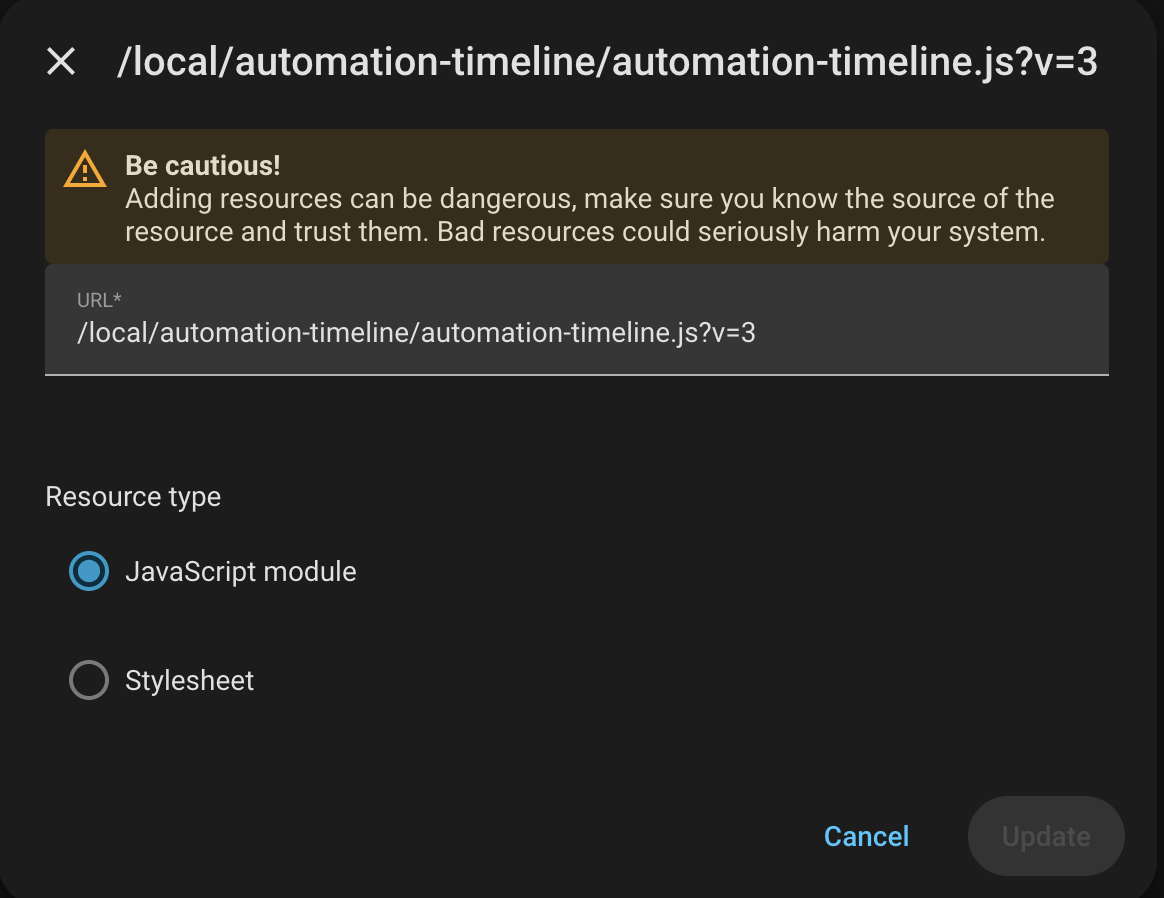
-
Add the custom card to a dashboard view. Open the dashboard, select Edit dashboard, choose Add card, select Manual, and paste in the card configuration below. With
auto_discoverenabled, it reads the time-based automations and their schedules automatically:type: custom:automation-timeline hours: 24 auto_discover: true -
Reload the dashboard resources or refresh the browser after saving the files. If Home Assistant does not recognize the card, check the browser console and make sure the resource URL points to the entry file under
/local/automation-timeline/.
The hours value controls how far into the future the timeline looks. The card can also be given schedules explicitly when an automation cannot be discovered automatically. Each schedule needs a name, a time in HH:MM format, and a list of weekday numbers where Sunday is 0 and Saturday is 6:
type: custom:automation-timeline
hours: 24
schedules:
- name: Morning lights
description: Turn on the lights
time: "07:00"
days: [1, 2, 3, 4, 5]
The optional show_disabled_entity setting can point to an input_boolean. When that helper is on, disabled automations are shown; otherwise disabled scheduled occurrences are hidden:
type: custom:automation-timeline
hours: 24
auto_discover: true
show_disabled_entity: input_boolean.show_disabled_automations